
Google Messages
Google LLCCommunication
4.6722.45K Reviews
- Version
- Varies With Device
- Installs
- 10.00B
- Age Rating
- Everyone
Screenshots
Our Review of Google Messages
 Analysis by Appyee
I reach for a messaging app most when I need a conversation to stay simple: confirm a plan, answer a family message, or find an address someone sent last week. Google Messages is Google’s communication app for those everyday exchanges, and its main appeal is that it keeps texting close to the center of the phone rather than asking me to move every conversation to a separate social platform. That makes it familiar, but it also means its strengths depend on how the people I talk to communicate.
Made by Google LLC, it is free and rated for Everyone. Its reach is enormous, with over ten billion installs, and its 4.4 average comes from around 43 million ratings. Those figures suggest that many people use it as a regular part of their phone routine, but popularity alone does not make it right for every group. I would consider it first if I want a straightforward place for SMS and RCS conversations, and less readily if my friends or workplace have already settled on a different messenger.
How Google Messages Fits into Everyday Conversation
I find Google Messages most useful when a conversation needs to be easy to start and easy to leave until I have time to reply. In this section, I’d focus on how phone-number texting fits everyday plans, while keeping in mind that a call or a group-focused messenger can be clearer when timing or coordination matters.
A familiar place for practical messages
Ever found yourself drowning in a sea of texts and notifications, wishing for some magical way to organize them all? Well, let me introduce you to Google Messages. It's like the Swiss Army knife of messaging apps, bringing a slew of features to make your texting life a breeze.
So, I downloaded Google Messages and right out of the gate, the app greets you with a clean, simple interface. No clutter, just a straightforward layout that makes finding your way around as easy as pie. The design sticks to Google's Material You aesthetic, which means it's not just functional but also easy on the eyes.
Setting up the app is a walk in the park. Just link your phone number, and boom! You're ready to start texting. It’s compatible with both SMS and RCS (Rich Communication Services), so you don't have to worry about missing out on any modern messaging perks.
The SMS and RCS combination is the key to understanding its role. SMS keeps it useful for ordinary phone-number texting, while RCS can offer a more modern-feeling exchange when the conversation supports it. In practice, I would not assume every chat behaves identically: the experience can vary with the other person’s device, app, and connection. If a message matters, I pay attention to the conversation’s available indicators rather than assuming every feature is active in every thread.
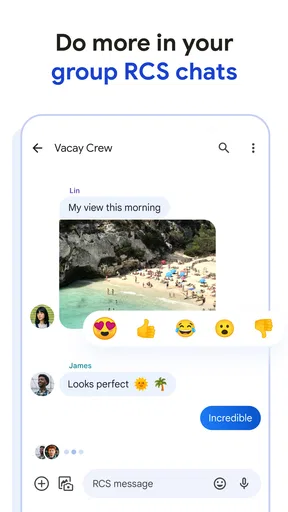
That makes the app especially handy for mixed groups. A family might have different phones and different habits, yet everyone can still reach one another through familiar phone numbers. I can use it to send a quick “I’m running late,” share a photo from an outing, or keep a short exchange about a delivery in the same place as other texts. It is less compelling when a group expects everyone to use a platform with its own shared channels, community features, or established norms.
Keeping a conversation moving
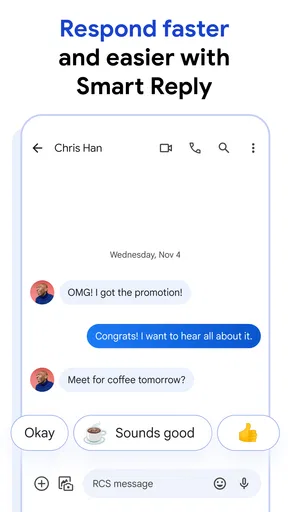
Now, let’s dive into the features that make this app a must-have. One of the highlights is the smart replies. You know those times when you're too busy to type out a full response? Google Messages has your back with quick, context-based responses that pop up right when you need them.
I treat suggestions as a way to keep a small exchange moving, not as a substitute for deciding what I actually want to say. A short suggested reply can be convenient when I am confirming a simple plan, but it can feel too abrupt when someone has shared something personal or needs a considered answer. The useful habit is to glance at the suggestion, then edit or ignore it whenever the tone does not fit. Fast replies are best for reducing typing, not for automating tact.
Another nifty feature is the search function. Imagine trying to find that one message from weeks ago. With Google Messages, you can search through your chats with keywords, making it super easy to locate old conversations.
Search is most valuable when I use a concrete clue instead of scrolling through a long thread: a street name, the name of a restaurant, or a distinctive word from the message. That turns a chat history into a practical record of arrangements. It is also a reason to be thoughtful about what I send. Messages can be useful to retrieve later, but that convenience does not make a text the best place for information I would not want sitting in a conversation history.
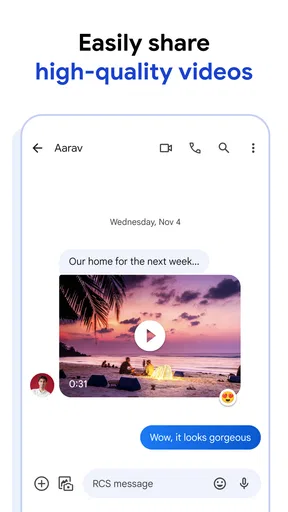
And let's not forget about the media sharing. Whether it's photos, videos, or voice notes, sharing media is seamless. Plus, the app supports high-quality images, so your photos don't lose their charm when sent.
For an everyday example, I might be coordinating a weekend visit while on the move: send the time, search back for the address, then share a photo so the other person knows which entrance I mean. Keeping those steps in one thread reduces the back-and-forth of switching apps. Still, media-heavy conversations are not always a reason to choose SMS-style messaging over a dedicated service; if a group relies on shared albums, ongoing reactions, or a persistent community space, its usual platform may suit them better.
Google services and the limits of convenience
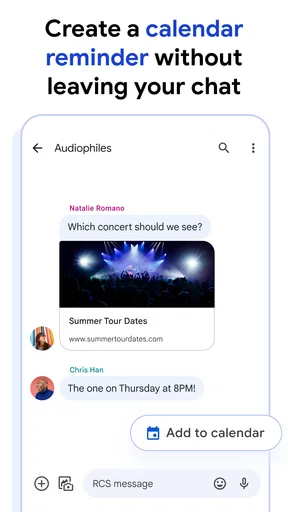
If you're already living in the Google ecosystem, you’ll appreciate how well Google Messages integrates with other Google services. Need to send a meeting invite? You can easily do it through the app. Google Assistant is also integrated, ready to help with tasks like setting reminders or checking the weather, all without leaving the chat screen.
That kind of convenience can make a short task feel less interruptive: I can keep my attention on the conversation instead of jumping between screens. But I would not make the app my planning system. A text about a meeting is still a text; if the details need to stay organized for a team or be updated by several people, a calendar or shared work tool is the clearer place for them. Messaging works well for agreeing on a plan, while a dedicated organizer is better for keeping that plan dependable.
There is a similar trade-off with voice and media. A voice note can convey tone faster than a long written explanation, but it is not as easy to scan later as a short, specific text. If I am sending a time, address, or instruction that someone may need to check while busy, I prefer to type the key detail even when I add an audio message. That small choice improves clarity without demanding that the other person replay a recording to find one fact.
Privacy, performance, and what to check
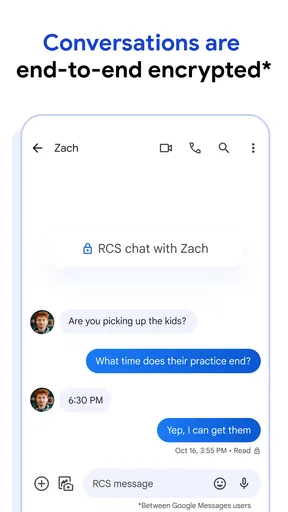
In the age of data privacy concerns, Google Messages offers end-to-end encryption for one-on-one chats. This means your messages are for your eyes only, adding a layer of security that’s reassuring. While group chats aren't encrypted yet, it’s a step in the right direction for privacy-conscious users.
The practical lesson is to distinguish between a one-to-one chat with encryption and a group conversation rather than treating all messages as equally protected. When a conversation is sensitive, I would check the chat’s status and consider who is included before sending. For especially confidential communication, the right choice is a service and conversation that clearly meet everyone’s privacy needs; convenience by itself is not a security guarantee.
Let's talk performance. Whether you're using a high-end flagship or a budget device, Google Messages runs smoothly. I didn’t encounter any lags or crashes, and messages are sent and received almost instantaneously. The app is also light on resources, so it won't bog down your phone’s performance.
My experience with a smooth interface does not erase the practical dependencies of messaging: delivery still relies on the conversation setup and connectivity, and an app cannot make another person respond. I also would not judge a message’s urgency from how quickly it appears on screen. For anything time-sensitive, a direct call can be more appropriate than sending a text and waiting for the other person to notice it.
Personal touches without changing the basics
Personalization is where things get fun. Google Messages offers themes and customization options to match your style. You can change chat colors and even set custom notifications for different contacts. It’s all about making the app truly yours.
Custom notifications can do more than decorate the experience: they can help me recognize whether a message is worth checking immediately or can wait, depending on the contact and the situation. I would use that lightly. If every person or thread is marked as urgent, the distinction stops helping, and the phone starts pulling attention back throughout the day. A small amount of personalization can make conversations easier to identify without turning every incoming text into a demand.
Choosing the right rhythm for messages
For me, the biggest question is not whether the app can send a message, but whether texting is the right pace for the conversation. Google Messages works well for exchanges that can wait a few minutes: confirming an appointment, asking a quick question, or sending a photo. It is less suited to a discussion that needs several people to respond together in real time. In that case, a call or a group-focused messenger can save a string of fragmented replies.
I also like that a message does not require me to be present at the exact moment it arrives. That flexibility is useful for friends and family with different schedules, but it can blur boundaries if I feel obliged to answer every notification immediately. Muting or adjusting notifications, where available in my setup, is a sensible way to make texting fit my day rather than letting every incoming message set its pace. A reply can be thoughtful without being instant.
Compared with social messaging apps, Google Messages feels more rooted in phone-number conversations than in a separate social world. That is an advantage when I need to reach someone using the number I already have, and a disadvantage if my circle expects features and habits tied to another service. Compared with email, it is quicker and more conversational, but less appropriate for long explanations or messages that need a formal structure. The best alternative depends on the job: a call for urgency, email for a detailed record, and a group platform for ongoing coordination.
Google Messages was released on November 12, 2014, and has grown into a familiar option for everyday communication. It has around 674,000 written reviews, but I would still judge it by my own needs: whether the people I contact can use the conversations I want, whether its notification controls fit my routine, and whether I am comfortable with the privacy distinctions between chat types. Its broad adoption is reassuring if I need a common starting point, not a reason to overlook those details.
Final Thoughts: A Solid Choice
In a world filled with messaging apps, Google Messages stands out with its simplicity, efficiency, and integration capabilities. Whether you're a casual texter or someone who relies on messaging for work, this app has something for everyone. It’s not just an app; it’s a tool that streamlines communication, making it more enjoyable and efficient.
I would recommend it to someone who wants a clean, practical home for phone-number conversations, particularly if they switch between simple texts and richer chats and value being able to find old details. I would hesitate to recommend it as the single answer for a team that needs coordinated project discussions, a group that has already adopted another messenger, or anyone who needs every conversation to have the same privacy properties. Those are real differences in use, not flaws a tidy interface can solve.
If you haven't given Google Messages a shot yet, it might just be time to jump on the bandwagon. Head over to your app store, download it, and experience the magic for yourself. Trust me, you won’t be disappointed.
Privacy and Permissions
See what permissions an app requests and how it handles your data.
- Identity
- find accounts on the device, add or remove accounts, read your own contact card
- Contacts
- find accounts on the device, read your contacts, modify your contacts
- Location
- approximate location (network-based), precise location (GPS and network-based)
- SMS
- read cell broadcast messages, read your text messages (SMS or MMS), receive text messages (MMS), receive text messages (SMS), receive text messages (WAP), send SMS messages, edit your text messages (SMS or MMS)
- Phone
- directly call phone numbers, directly call any phone numbers, modify phone state, read phone status and identity
- Photos/Media/Files
- read the contents of your USB storage, modify or delete the contents of your USB storage
- Storage
- read the contents of your USB storage, modify or delete the contents of your USB storage
- Camera
- take pictures and videos
- Microphone
- record audio
- Device ID & call information
- read phone status and identity
- Other
- view network connections, change network connectivity, measure app storage space, full network access, run at startup, control vibration, prevent device from sleeping, read Google service configuration
How Google Messages Compares
Full ComparisonGoogle Messages suits Android-first texting, WhatsApp fits people who want private chats with a broad audience, and Telegram appeals to users who value customization and large file sharing.
| App | Developer | Rating | Price |
|---|---|---|---|
 Google MessagesThis App | Google LLC | 4.6 | Free |
 WhatsApp Messenger | WhatsApp LLC | 4.6 | Free |
 Telegram | Telegram FZ-LLC | 3.8 | Free |
Verdict
Strengths of Google Messages
- Seamless integration with Android devices.
- RCS support for enhanced messaging features.
- Clean, user-friendly interface.
- Easy media sharing and attachments.
- Reliable and fast message delivery.
Limitations of Google Messages
- Limited customization options.
- Some features require data connection.
- Occasional syncing issues.
- No end-to-end encryption for SMS.
- Lacks advanced organization tools.
Other Releases by Google LLC
View All
Google Calendar
Productivity4.6

Tools4.0

Google TV
Video Players & Editors3.9

Android Auto
Auto & Vehicles4.1
Similar Picks in This Category
View All
Gmail
Google LLC4.1

Google Meet
Google LLC4.4

Google Chrome
Google LLC4.1

WhatsApp Messenger
WhatsApp LLC4.6

Carrier Services
Google LLC4.2

Contacts
Google LLC4.3
You May Also Like
View All
Frequently Asked Questions
What features does Google Messages offer?
Google Messages provides a variety of features including SMS and MMS messaging, group chats, and multimedia sharing. It also supports Google's RCS (Rich Communication Services) for enhanced messaging capabilities like read receipts, typing indicators, and high-resolution photo sharing. Additionally, it integrates with Google Assistant for smart replies and suggestions.
Is Google Messages secure and private?
Yes, Google Messages ensures secure communication through end-to-end encryption for one-on-one chats. This means that only you and the person you’re messaging can read the content. However, encryption for group chats and SMS is not yet available, so it's important to be aware of these limitations when considering privacy.
Can I use Google Messages on multiple devices?
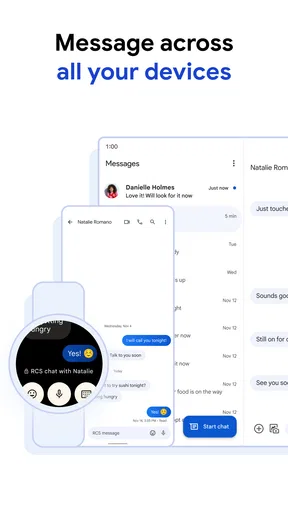
Google Messages offers a web version that allows you to send and receive messages from your computer. Simply scan the QR code with your phone to sync your messages. However, note that this feature requires your phone to remain connected to the internet and nearby.
Does Google Messages work without an internet connection?
Google Messages can send and receive SMS and MMS messages without an internet connection, as these are carrier-based services. However, RCS features like chat messages and media sharing require an internet connection, either through mobile data or Wi-Fi, to function properly.
How does Google Messages compare to other messaging apps?
Google Messages stands out with its integration of SMS and RCS, offering a seamless transition between traditional and modern messaging. While it may lack some features of dedicated apps like WhatsApp or Telegram, such as voice calls, its simplicity and integration with Android devices make it a reliable choice for many users.
